xrsim
Public CLI, private source — install with npm, the repo itself isn't open yetA simulator for VR apps: boot the build, script the headset, assert on what the app actually believes — no headset, no human in the room.
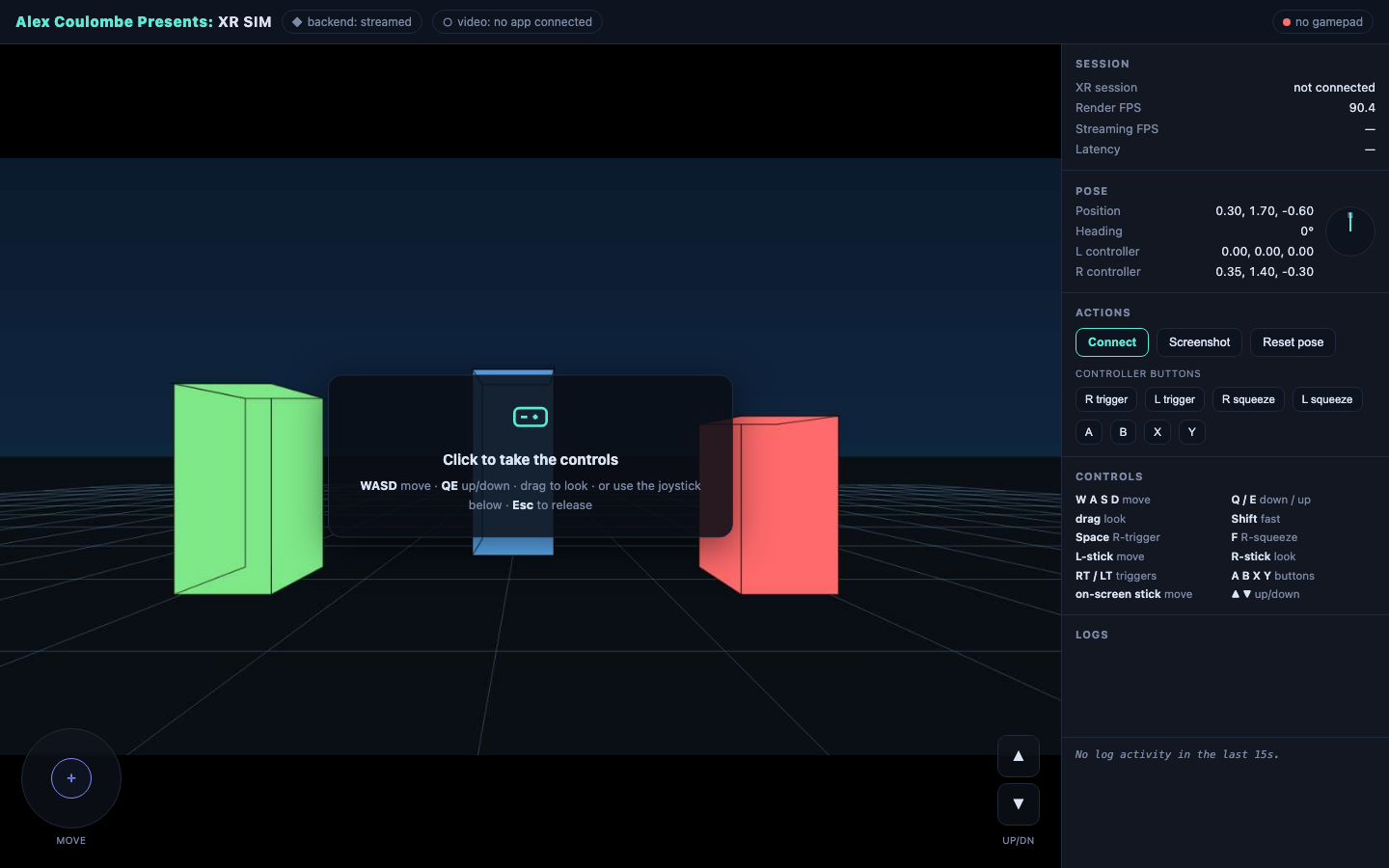
iPhone developers have had the Simulator for fifteen years — boot the app on your Mac, script it, test it in CI, never pick up a phone. VR never got that. Every change means packaging, side-loading, strapping on a headset, and walking around a room to see if it worked. xrsim is the missing piece: it stands up a scripted virtual headset and hand controllers, walks them through a build on a real path, and reads back what the app is actually thinking — all headless, repeatable, and drivable by an AI agent.
A scripted headset, driven from a file
A trajectory is just JSON: at t=0 the head is here, by t=4 it's drifted there, at t=8 the controller pinches. xrsim plays it back into a running VR build as if a person were wearing the headset — smooth interpolated motion, real controller input — so the same 'walk up to the thing and look at it' test runs identically every time instead of depending on how you happened to move that day.
Hands, not just controllers
Controllers were the easy half. `xrsim hand` drives a full 25-joint tracked hand — named poses, analog pinch, wrist placement, and a live joint read-back a test can assert on. Three poses ship built in and you can register your own from a file (fist, open palm, peace, finger guns, per-finger pinches). It's verified where it counts: a driven pinch closed the thumb-index gap the consuming app measures from 9.4 cm down to 1.5 cm while the undriven hand stayed open as a control. The honest limit is stated in the docs rather than papered over — this tests gesture *logic* headlessly, not real-world tracking quality.
Read the app's mind, not just its pixels
The hard part of testing VR isn't sending input — it's knowing whether the app got it right. xrsim opens a live channel into the running build so a test can ask it questions: did you lock onto the marker? what world position do you think the headset is at? how confident are you? The app answers over the wire, and the test asserts on the answer. Pixels lie; internal state doesn't.
Proven on the hardest thing first
The first real target was co-location — the problem of making a virtual world line up with the physical room to within a couple of centimeters, normally impossible to test without a headset and a tape measure. xrsim ran the whole loop headless: a simulated headset walked a path in front of the app's virtual markers, the app detected them, solved its position, and locked on — and the test asserted the answer was right to 0.4 cm. One command, exit code zero, nobody in the room.
Built for the agent era
Every capability is one command with a clean pass/fail, so an AI build agent can close its own loop: change the code, run the trajectory, read the assert, fix what broke — the same edit-test-repeat cycle a web developer takes for granted, finally available for spatial apps. It runs on a plain workstation with no headset attached, which means it runs in the background, overnight, at whatever scale the work needs.
The frontier
Streamed PC-VR testing is a daily driver now, and standalone on-device simulation shipped too — a real GPU-accelerated Android emulator runs an actual standalone OpenXR APK locally, no streaming pipeline at all, verified against both a shipped Godot VR game and real Android XR builds (Galaxy XR-class devices). Controller button input on that on-device path is real and scripted too — a live button press dispatches into the running app and the app's own code reacts to it, not a synthetic event that only looks like input. Current frontier: full head/controller pose injection for that same on-device path — button presses work today, movement doesn't yet, and that gap is public, not hidden (see the docs).
At a glance
- ✦Scripted virtual headset + controllers played back from a JSON trajectory
- ✦25-joint hand tracking with named poses, analog pinch, and joint read-back — a driven pinch closed a measured thumb-index gap from 9.4 cm to 1.5 cm
- ✦Live introspection channel — assert on the app's actual internal state, not screenshots
- ✦One-command, pass/fail runs an AI agent can drive in its own edit-test loop
- ✦Runs fully headless on a plain workstation — no headset, background, overnight, at scale
- ✦First proof: headless co-location verified to 0.4 cm accuracy, start to finish
- ✦Standalone on-device: a real GPU-accelerated Android emulator runs actual OpenXR APKs (PICO-native and Android XR), no streaming pipeline
- ✦Real controller button input on-device — a scripted trigger press reaches the app's own code, confirmed via device logs, not just a synthetic event
- ✦Per-device performance envelope: throttle a demo to a chosen headset's real frame budget
- ✦Free forever to explore (help + the built-in demo cockpit, no account needed); a 14-day trial covers pointing it at a real app, then it's free for active members or a one-time purchase — see the store link below
See it in use
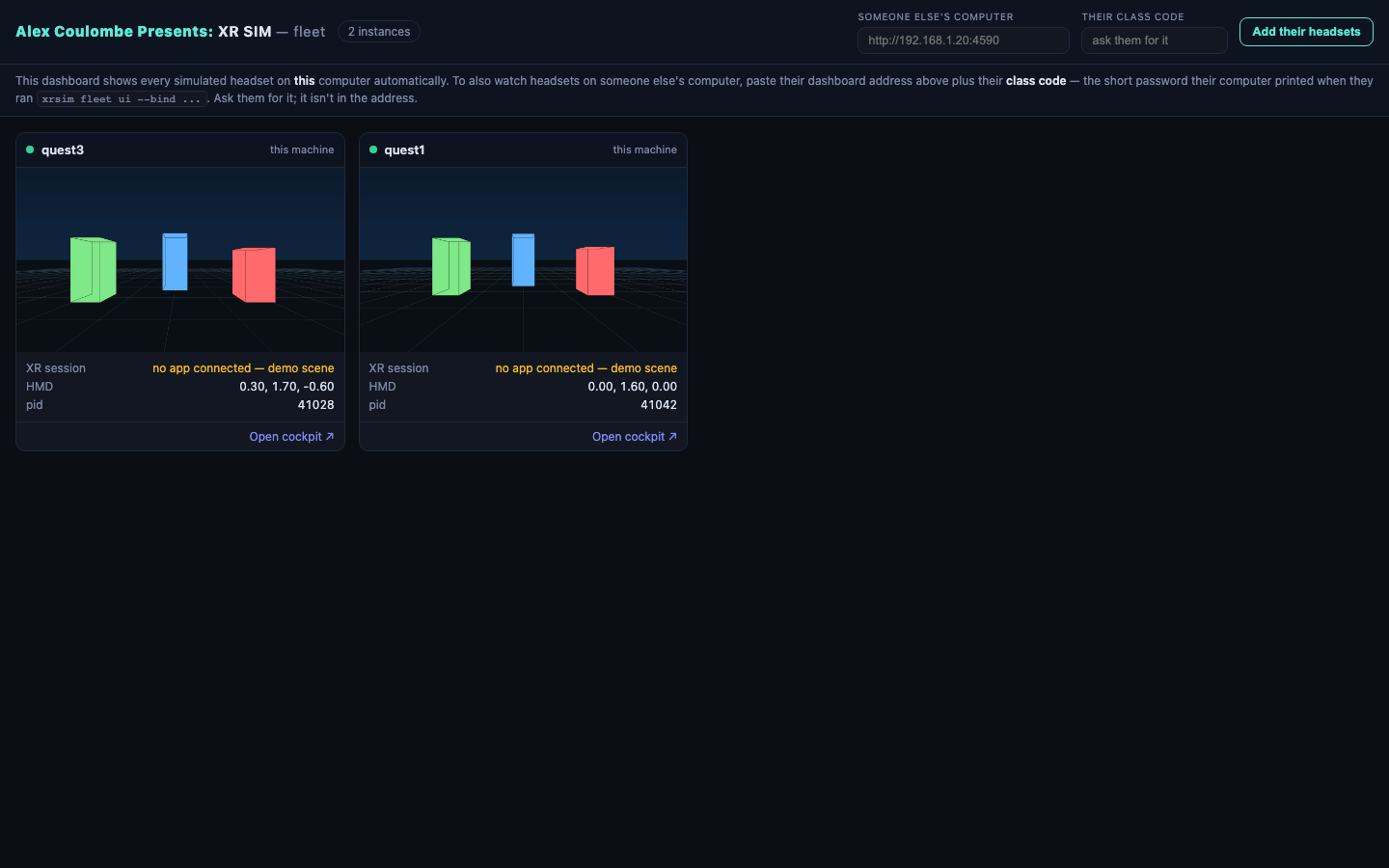
Try it now.
xrsim is available today — install it below, free to explore with a 14-day trial. Free for active members after that; everyone else buys a license once, no subscription. The source repository itself isn't public yet.
Also in the lab
SceneAudit
Measure the gap your viewport hides.
Video QA Workbench
Stop scrubbing for proof. Review the whole render with evidence.
Forage
Fab's best friend. An AI-first scout and installer for the Unreal Engine packs you already own.
Project Ion
Your Vision Pro is a projector now. Professional-grade projection-mapping previsualization — honest ambient simulation, real projector specs, and a full creative rig in your room.
UnRealityKit Bridge
Unreal Engine as the simulation brain. RealityKit as the renderer. The hybrid architecture Unity proved out with PolySpatial — open for Unreal.
UE→RenderMan Bridge
One button in the Unreal editor. Film-grade Pixar RenderMan on the other side.
Pinchwork
Universal OpenXR hand tracking. Built in Unreal first — designed for every headset, not just one.
Apple Vision Pro + OpenXR
The engine-level work behind Unreal on Apple Vision Pro over OpenXR — punch-list fixes today, Lumen and Nanite research pushing further.
Constellation
Your second brain as a navigable 3D star map. Walk through your own notes on Apple Vision Pro.
Promptbook
Spatial blocking and set previz for theatre on Apple Vision Pro — the stage manager's promptbook, reimagined in 3D.
AgileLensMultiplayer
The shared SharePlay engine every Agile Lens Vision Pro multiplayer app runs on.
Mission Control
A live radar for SharePlay sessions — watch every player, in every app, without joining the call.
RoomScanPro
Collaborative room scanning and real-world measurement for Apple Vision Pro and iPhone.
Co-Location Engine
Fiducial-marker-based co-location for Unreal Engine VR — real and virtual players sharing one room, without a shared coordinate system to begin with.
Fable Showcase
A playable experiment in how reliably AI and a headless Unreal toolchain can build a museum-scale experience with limited handholding.